woensdag 1 januari 2025

Insta360 Ace Pro 2 Vs DJI Action 5 Pro

 Insta360 Ace Pro 2 Vs DJI Action 5 Pro full comparison. 

Dji osmo action 5 pro vs insta 360 ace pro 2. dji osmo action 5 pro vs insta 360 ace pro 2 main differences below.... 

DJI Osmo Action 5 Pro : Equipped with a 1/1.3-inch sensor, it films in 4K up to 120 fps, with 10-bit recording to capture more details in dark and bright areas. This model is particularly suitable for creators looking for excellent color and detail management. 

Insta360 Ace Pro 2 : Equipped with a 1/1.3-inch sensor co-developed with Leica, it films in 8K at 30 fps, and offers PureVideo mode for excellent low-light management, making this camera ideal for shooting in all conditions. 

DJI Osmo Action 5 Pro : Equipped with a built-in gyroscope and stabilization on all video modes, the DJI Osmo Action 5 Pro stands out for its ability to follow movements with precision. Whether you're filming in slow motion or in 4K, the camera guarantees shake-free footage. 

Insta360 Ace Pro 2 : Thanks to FlowState Stabilization , this camera guarantees smooth videos even in the most hectic conditions. Horizon lock keeps the image perfectly stable, even if the camera rotates 360°. This is a major asset for extreme sports or complex shots. Insta360 Ace Pro 2 leaks reveal an 8K AI-powered action.


 To video

dinsdag 31 december 2024

My 5 SECRET Weapons in DaVinci Resolve 19

  In this video: Learn 5 time-saving editing and grading tricks in DaVinci Resolve to speed up your workflow 


 To video

maandag 30 december 2024

Beginnen met Editten in DaVinci Resolve - Een Stapsgewijze Tutorial

 Welkom bij deze beginners-tutorial voor DaVinci Resolve op het YouTube-kanaal van Videolab Alkmaar! 🎬 In deze video leer je stap voor stap de basis van het editten in DaVinci Resolve. Perfect voor iedereen die net begint met videobewerking en snel aan de slag wil. 💡 Wat je leert in deze video:

  • Hoe je een nieuw project aanmaakt
  • Basisfuncties van de interface
  • Simpele cuts en overgangen maken
  • Je project exporteren


Naar video

zondag 29 december 2024

Fastest External Thunderbolt SSD Enclosures For Mac and PC - Who Win

 We test the fastest External Thunderbolt and USB4 Enclosures (40 Gbps enclosures) to see which one is the fastest. In this video we test 7 different brands with the same Orico O7000 M.2 NVMe SSD to see how each external enclosure performs against the others. If you are interested in finding the fastest external storage this video might help you in your search. This is a great option for fast external storage for your Mac computer or Windows PC.


To video

DJI Neo | Besturen zonder controller of telefoon | Review

De DJI Neo is een goed betaalbare drone van DJI. Hij weegt maar 135 gram en je kan hem besturen zonder controller of telefoon. Hij stijgt uit zichzelf op vanuit je hand, maakt een shot en land terug op je hand! Filmen doet hij in 4K dus de beelden die je maakt zien er mooi uit. Martijn vertelt je alles over deze nieuwe drone.


Naar video 

Roman Gladiator Women | A Cinematic AI Short Film

 What started as a casual exploration of beautiful women in ancient Rome transformed into this dynamic short film! 🎥✨ I was initially just playing around with imagery, but once I dressed these women in gladiator outfits and found the perfect music, a whole new vision emerged.


To video

zaterdag 28 december 2024

Experience ANCIENT EGYPT like never before! A short film about artificial intelligence

 If you enjoyed this video, I would appreciate it if you subscribed, liked and commented. Your support is very important and helps the channel grow!


To video

vrijdag 27 december 2024

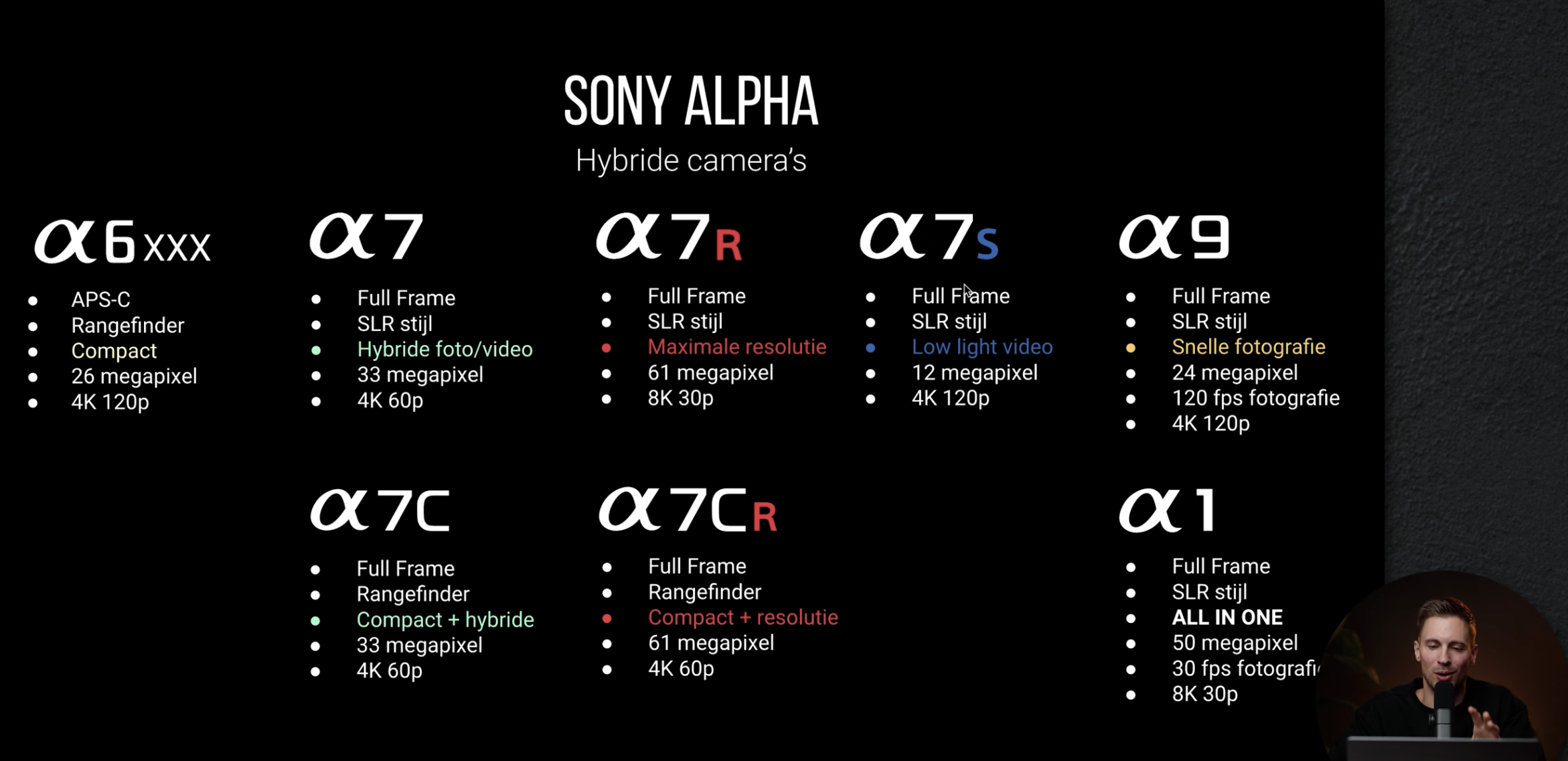
Welke SONY CAMERA moet je kopen in 2025?!

 Welke Sony camera moet ik kopen? Wat zijn de verschillen? En welke camera's komen eraan in 2025? Ik ga je camera advies geven!


Naar video

donderdag 26 december 2024

5 PRACTICAL Ways to Use the Magnetic Mask

Final Cut Pro 11 is here, and the new Magnetic Mask is a game-changer! Whether you’re a beginner or a pro, this feature will elevate your videos to the next level. In this tutorial, I’ll demonstrate 5 practical ways to use the magnetic mask to enhance your editing workflow. From text effects to color correction, here’s what we’ll cover: 📝 What You'll Learn: 

1️⃣ Text Behind Subjects – Easily place text behind people or objects for a professional look. 

2️⃣ Color Correction – Refine your footage with precise subject masking. 

3️⃣ Special Effects – Highlight or blur specific areas with ease. 

4️⃣ Fake Depth – Add cinematic depth of field in post-production. 

5️⃣ Creative Transitions – Craft seamless transitions with isolated subjects.


To video

woensdag 25 december 2024

This free AI image editor is INSANE

 MagicQuill installation tutorial & review. Free open-source image editor


To video